Top Things to Consider When Purchasing a Laser Cutting Machine
Shopping for a laser cutting machine can feel exciting, but you want to avoid common pitfalls. Many small business owners make mistakes like setting the wrong focal distance or skipping test cuts. Others forget to check belts or ignore dust and debris. You might run into problems if you use too much current or miss key settings.
- Overheating the laser tube’s electrodes
- Uneven edges from poor focus
- Loose or tight belts causing bad engraving
- Not fastening the lens securely
- Overlapping lines making jagged edges
- Wasting materials by not optimizing the cutting sequence
- Burnt corners from wrong power or speed
- Forgetting to run a test cut
- Dust causing shorts or overheating
- Incorrect docking points leading to malfunctions
Paying attention to these details helps you get the best results and keeps your business running smoothly.
Key Takeaways
- Set a clear budget before shopping. Understand the initial costs and ongoing expenses like maintenance and electricity.
- Identify your specific business needs. Consider the types of projects you want to tackle and the materials you will use most often.
- Choose the right machine size. Ensure your workspace can accommodate the machine and allows for safe movement and ventilation.
- Evaluate machine specifications carefully. Look for features like bed size, laser power, and material compatibility to match your projects.
- Prioritize ease of maintenance. Regular cleaning and timely replacement of parts will extend the life of your machine.
- Research manufacturer support. Check for availability of replacement parts and technical assistance to minimize downtime.
- Read customer reviews and warranty policies. This helps you gauge the machine's performance and understand long-term costs.
- Plan for future growth. Select a machine that can adapt to new projects and allow for upgrades as your business expands.
Assessing Your Business Needs for a Laser Cutting Machine
Setting Your Budget
Initial Investment
Before you buy a laser cutting machine, you need to know how much you can spend. Prices can vary a lot based on the level of automation you want. Here’s a quick look at what you might expect to pay:
| Automation Level | Price Range |
|---|---|
| Basic Automation | $2,000–$10,000 |
| Semi-Automation | $15,000–$100,000 |
| High Automation | $100,000+ |
You might want a basic model if you’re just starting out. If you plan to grow fast, a semi-automated or high-automation machine could make sense. Think about your business goals and how much you can invest right now.
Ongoing Costs
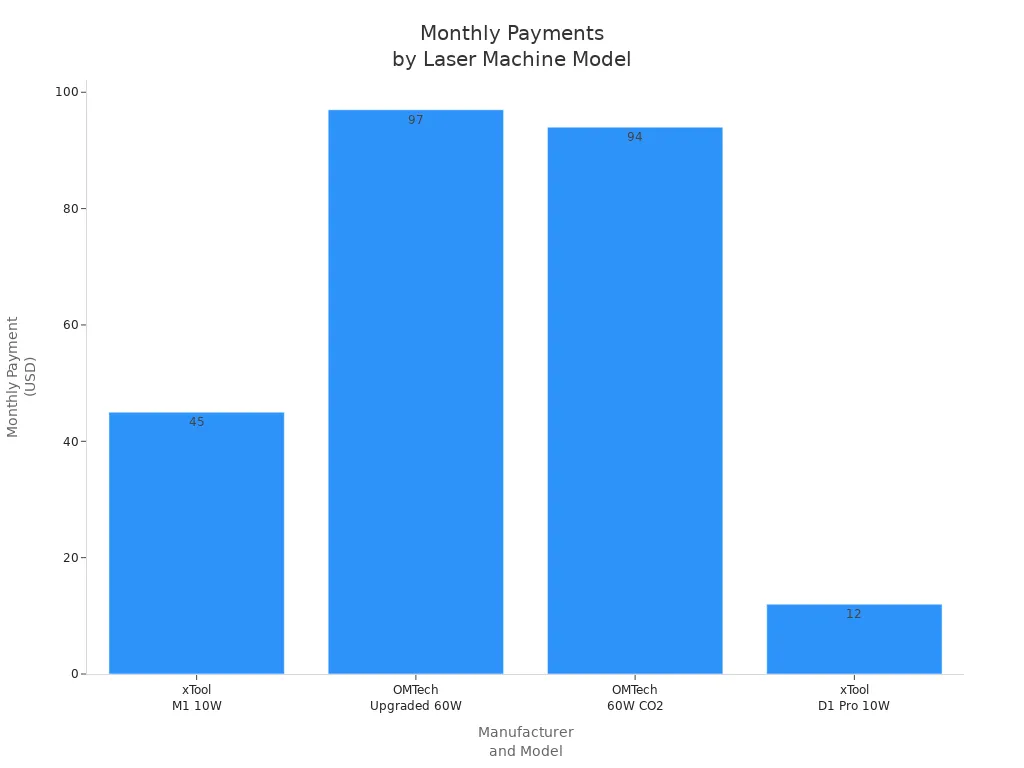
Buying the machine is just the beginning. You’ll also have to pay for things like maintenance, replacement parts, and electricity. Some machines use more power, especially high-power models. You should also consider financing options. Many manufacturers offer monthly payment plans, which can help you manage your cash flow. Here’s a quick comparison:
| Manufacturer | Model | Monthly Payment |
|---|---|---|
| xTool | M1 10W Laser Engraver | $45/month |
| OMTech | Upgraded 60W CO2 Laser Engraving Cutting Machine | $97/month |
| OMTech | 60W CO2 Laser Engraver | $94/month |
| xTool | D1 Pro 10W Laser Engraver | $12/month |
💡 Tip: Don’t forget to budget for software updates and training. These costs can add up over time.
Defining Your Niche and Applications
Specific Business Uses
You want your laser cutting machine to fit your business. Some businesses use these machines for many different jobs. Others focus on one thing. Here are three top business types that get the most from laser cutting:
- Job shops: You can handle many materials and offer custom work.
- Die cut businesses: You can make special shapes and designs for clients.
- Fabric cutters: You can cut fabric quickly and seal the edges at the same time.
Think about what you want to do most. Do you want to make signs, custom gifts, or parts for other companies? Your answer will help you choose the right machine.
Project Types
Every project is different. Some jobs need fine details, while others need speed or the ability to cut thick materials. If you plan to make small, detailed items, you might want a machine with lower power and high precision. If you want to cut large sheets or thick metal, you’ll need more power.
📝 Note: Write down the main projects you want to tackle. This list will help you pick the best features for your needs.
Choosing Materials for Your Laser Cutting Machine
Types of Materials
You should know what materials you want to cut before you buy a machine. Many small businesses use these materials:
- Acrylic
- Plywood
- MDF
- Cardboard
- Leather
- Plastics
- Cork
- Textiles
- Paper
Some machines work better with certain materials. Make sure the machine you pick can handle your favorites.
Material Thickness
Material thickness matters a lot. Thicker materials need more power and slower speeds. Thinner materials cut faster and need less power. Here’s a table to help you see the differences:
| Parameter | Thicker Materials | Thinner Materials |
|---|---|---|
| Required Power | Higher power needed for deeper cuts | Lower power for quick cuts |
| Cutting Speed | Slower speeds for quality | Faster speeds, less heat impact |
| Lens Focal Length | Longer focal length for deep cuts | Shorter focal length for sharp focus |
For example:
- Cutting 20 mm thick steel may need a 3000-watt laser.
- Cutting 10 mm thick steel may only need 1500 watts.
- For 25 mm stainless steel, you must slow down to get a clean cut.
🔍 Tip: Always check the specs for both the machine and the materials you plan to use. This step helps you avoid costly mistakes.
Estimating Production Volume
Daily Output
You want your laser cutting machine to keep up with your business. Think about how many items you need to produce each day. If you run a busy shop, you might need a machine that can handle lots of jobs without slowing down. Some machines work faster than others. You should check the specs for cutting speed and cycle time. These numbers tell you how many pieces you can finish in a day.
Ask yourself these questions:
- How many orders do you get each week?
- Do you need to cut large batches or just a few items?
- Will you run your machine all day or only a few hours?
If you plan to grow, pick a machine that can handle more work than you need right now. This way, you won’t have to upgrade too soon.
Scalability
You want your business to grow. Scalability helps you do that without spending too much money. Here’s how good scalability options help you:
- You save money because you don’t need to buy a new machine every time your business grows.
- You can add new products or change your product line easily.
- Your machine works faster, so you can finish orders quickly and compete with bigger companies.
If you choose a laser cutting machine with scalable features, you can meet new customer needs and expand your business when the time is right.
Space and Location Requirements
Workshop Size
Your workspace matters. You need enough room for your laser cutting machine and for you to move around safely. Measure your shop before you buy. Some machines are big and need lots of space. Others fit on a table or in a small corner. Make sure you have space for the machine, materials, and finished products.
Here are some tips:
- Leave extra space for loading and unloading materials.
- Keep walkways clear for safety.
- Plan for future growth. You might need more machines or storage later.
Ventilation and Safety
Safety comes first. Laser cutting creates smoke, gases, and tiny particles. You need good ventilation to keep the air clean and safe. Check local rules for air quality and safety. Many shops use fans, filters, or special vents.
Here’s a quick look at why ventilation matters:
| Aspect | Explanation |
|---|---|
| Emission of hazardous substances | Ventilation systems remove harmful gases, smoke, and particles produced during laser cutting, reducing operator exposure. |
| Maintain indoor air quality | Effective removal of harmful emissions is crucial for preventing respiratory issues and ensuring a safe working environment. |
| Prevent fires and explosions | Proper ventilation helps eliminate flammable gases generated during cutting, minimizing fire and explosion risks. |
| Comply with regulations | Adhering to safety and environmental regulations is essential to avoid legal issues and ensure workplace safety. |
You should also keep fire extinguishers nearby and check your machine for leaks or damage. Good safety habits protect you and your business.
Evaluating Laser Cutting Machine Specifications
Bed Size and Work Area
Standard Bed Sizes
When you pick a laser cutter, bed size matters a lot. The bed size tells you how big your projects can be. If you want to make small gifts or tags, you can use a compact machine. If you plan to cut large signs or lots of items at once, you need a bigger bed. Here’s a quick table to help you compare the most popular bed sizes for small businesses:
| Bed Size (mm) | Description | Ideal For |
|---|---|---|
| 600×400 | Compact and capable | Custom tumblers, small signage, ornaments, tags, engraved gifts |
| 900×600 | Most popular size | Medium signage, layered art, batch engraving, plaques, tags |
| 1300×900 | Built for production | Oversized signage, templates, large projects, high-volume work |
📝 Tip: Choose a bed size that matches your most common project. You don’t want to buy a huge machine if you only make small items.
Large vs. Small Machines
The size of your machine changes what you can do. Small machines fit on a table and work well for detailed jobs. Large machines handle big sheets and speed up production. Here’s how different sizes stack up:
| Machine Size | Working Area Dimensions | Suitable Applications |
|---|---|---|
| Large | > 12000 x 2500 mm | Heavy-duty industrial jobs, high-volume production |
| Small | Up to 130 x 130 mm, 130×250mm, 600×600mm | Intricate designs, detailed engravings, hobby projects |
| Medium | 3000 x 1500 mm to 8000 x 2500 mm | Versatile for medium businesses, many materials |
If you run a small shop, a medium or small machine usually works best. You can always upgrade later if your business grows.
Laser Power and Type
CO2 vs. Fiber Laser Cutting Machine
You have two main choices for laser type: CO2 and fiber. Each one has strengths and weaknesses. CO2 lasers cost less at first, but they use more energy. This means your electric bill can go up over time. Fiber lasers cost more to buy, but they save money because they use less power.
- Fiber lasers cut reflective metals like copper and brass with ease.
- CO2 lasers can get damaged by reflections from shiny metals.
- Fiber lasers last longer and keep their performance when cutting aluminum.
Here’s a table to help you compare:
| Feature | CO2 Laser | Fiber Laser |
|---|---|---|
| Power Consumption | Higher energy use | More energy-efficient |
| Initial Cost | Lower upfront cost | Higher upfront cost |
| Cutting Precision | Lower precision | Higher precision |
| Material Compatibility | Not great for reflective metals | Great for reflective metals |
| Working Life | Shorter lifespan | Longer lifespan (up to 25,000 hours) |
⚡ Note: If you plan to cut a lot of metal, especially shiny types, fiber lasers work better and last longer.
Power Ratings
Laser power changes how fast and how thick you can cut. Higher power means you can cut thicker materials and finish jobs faster. But more power also means higher energy use. Here’s a table to show how power ratings affect performance:
| Power Rating | Cutting Speed | Material Thickness | Energy Consumption | Precision |
|---|---|---|---|---|
| 3kW | Slower | Thinner materials | Lower | High |
| 4kW | Moderate | Moderate thickness | Moderate | High |
| 6kW | Faster | Thicker materials | Higher | High |
- Higher power gives you faster cutting speeds.
- A 6kW machine cuts thick materials better than a 3kW or 4kW model.
- More power means higher energy bills, so plan your budget.
Cutting Accuracy and Speed
Precision Levels
You want your cuts to look sharp and professional. Most modern machines can cut with an accuracy of ±0.05 to ±0.2 mm. That’s about as thin as a strand of hair! Many machines keep tolerances within ±0.1 mm, so your parts fit together perfectly.
- You get clean edges and smooth shapes.
- Your finished products look high-quality.
- You waste less material because cuts are so precise.
Speed Settings
Cutting speed depends on both the power of your machine and the thickness of the material. Higher power lets you cut faster, even through thick sheets. Here’s a chart that shows how cutting speed changes with different powers and thicknesses:
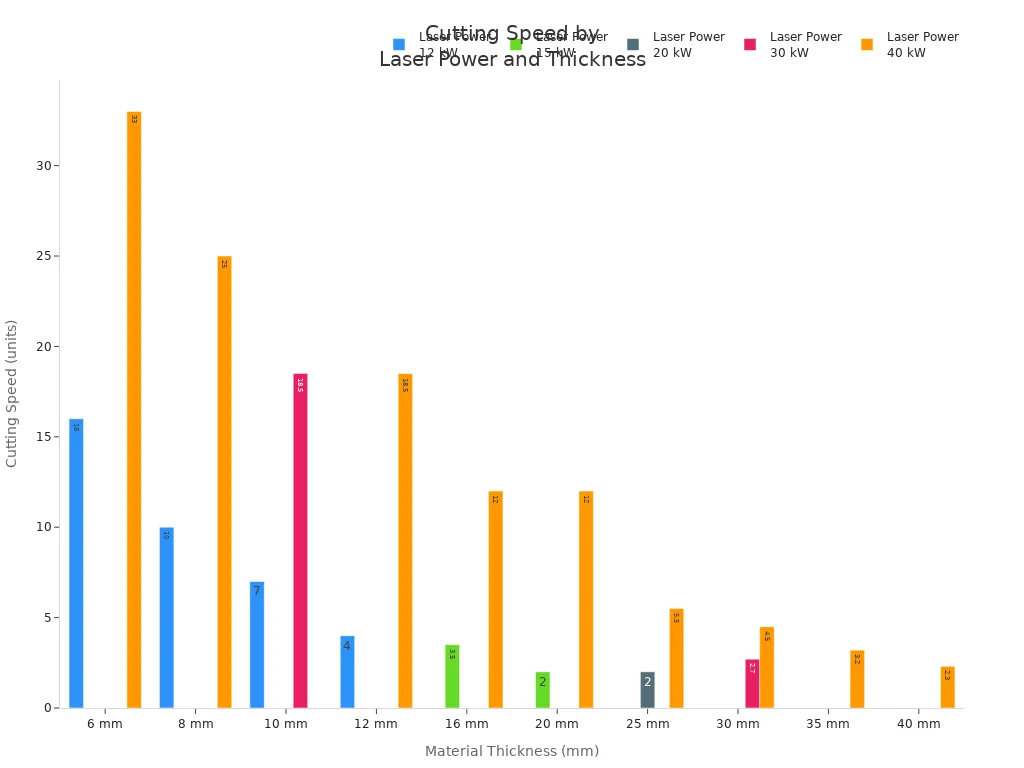
- Thicker materials slow down the cutting process.
- More powerful machines keep speeds high, even with tough jobs.
- You finish more work in less time with the right setup.
🚀 Tip: If you want to boost your output, pick a machine with higher power and adjustable speed settings. This way, you can match the speed to each project.
Material Compatibility
Supported Materials
You want your laser cutting machine to work with as many materials as possible. Entry-level machines handle a wide range of options, so you can experiment and grow your business. Here are some materials you can use:
- Wood
- Acrylic
- Leather
- Glass
- Cardboard
- Fabrics
- Paper
- Plexiglass
- Rubber
- Stone
Wood is easy to cut and engrave, making it a favorite for custom signs and crafts. Acrylic gives you clear, sharp edges and works well for displays. Leather lets you create detailed designs for wallets or belts. Glass is tricky, but you can engrave beautiful patterns. Cardboard and paper are great for prototypes and packaging. Fabrics like denim, felt, and cotton open up options for fashion and decor. Plexiglass is versatile and strong. Rubber and stone add unique touches to your product line.
You can also try metals like aluminum, brass, tin sheets, and stainless steel, but stick to thin sheets for best results. Each material brings something special to your projects.
💡 Tip: Test each material before you start a big job. You’ll learn how your machine handles different textures and thicknesses.
Limitations
Not every material works perfectly with a laser cutting machine. Some types pose safety risks or just don’t cut well. Here’s a quick look at common limitations:
| Material Type | Limitation Description |
|---|---|
| Nitro Compounds | Can react with oxygen at high temperatures, leading to explosions or fires. |
| Thicker Materials | Materials thicker than 0.25 inch (6mm) pose cutting challenges for consumer lasers. |
| Fragile Materials | Difficult to cut cleanly without causing damage. |
Nitro compounds and nitrates can react dangerously when exposed to the laser. You should avoid these for safety. If you try to cut materials thicker than 0.25 inch (6mm), most entry-level machines struggle and may not give clean results. Fragile materials, like thin glass or delicate fabrics, can break or burn easily.
- Nitro compounds and nitrates can cause unstable reactions.
- Thick materials may not cut cleanly.
- Fragile items need extra care.
Always check the manufacturer’s guidelines before you try a new material. Safety comes first, and you want your finished products to look their best.
Software and Connectivity
User Interface
You want software that feels easy to use. A good user interface helps you set up jobs quickly and avoid mistakes. Most laser cutting machines work with popular platforms, so you can choose what fits your workflow. Here are some options you might see:
- LightBurn
- LaserGRBL
- LaserWeb
- Open Builds CAM & Control
- Inkscape
- Adobe Illustrator
- CorelDRAW
- Affinity Designer
- Draftsight
- TurboCAD
LightBurn and LaserGRBL are favorites for beginners. They offer simple controls and clear instructions. If you like graphic design, you might prefer Adobe Illustrator or CorelDRAW. These programs let you create detailed artwork and send it straight to your machine.
📝 Note: Try out a few software platforms before you decide. You’ll find one that matches your style and makes your work easier.
File Format Support
You need your machine to read the files you create. Most laser cutting software supports common formats like SVG, DXF, PDF, and AI. This means you can design in your favorite program and send the file to your machine without extra steps.
Connectivity also matters. When your machine connects to your computer or network, you get real-time data and automation. You can monitor production, schedule jobs, and even collect data for business reports. Automated loading and unloading systems speed up your workflow and reduce downtime. IoT technology gives you insights into how your machine performs, so you can make smart decisions.
- Real-time data collection boosts efficiency.
- Better communication between software and machine improves precision.
- Integration with business systems helps you track jobs and plan ahead.
Choose a machine that supports the file formats you use most. Good connectivity turns your workshop into a smart, efficient space.
Support and Service for Your Laser Cutting Machine
Replacement Parts Availability
Local Sourcing
You want to keep your machine running without long delays. Local sourcing for replacement parts makes a big difference. Many top manufacturers set up strong support networks so you can get spare parts quickly. Here’s what you should look for:
- Suppliers with years of experience and deep industry knowledge.
- Access to a wide inventory and a vast sourcing network.
- Dedicated customer support and fast shipping options.
- Specialized suppliers for brands like Trumpf, offering nozzles, optics, and consumables.
When you choose a brand with a solid local presence, you spend less time waiting and more time working.
Lead Times
Lead time matters when your machine needs a fix. You don’t want to pause your business for weeks. Here’s a quick look at average lead times for popular suppliers:
| Source | Average Lead Time |
|---|---|
| SendCutSend | 2-4 business days |
| Laser Cutting Inc | 3-5 business days |
Fast lead times help you avoid costly downtime and keep your projects on track.
Technical Support and Training
Onboarding Resources
Learning to use a new machine can feel overwhelming. Good onboarding resources make it much easier. Some companies offer hands-on training that simplifies complex steps. For example, the MZBNL No-CAD Operating System lets you skip tricky software and focus on the basics. With this system, you can become confident in just one day, instead of spending weeks or months learning.
- Structured, hands-on training boosts your productivity.
- Simple systems reduce stress and help you learn faster.
- You feel more satisfied and ready to take on new jobs.
Troubleshooting Help
When something goes wrong, you need help fast. Leading manufacturers offer training in many areas, so you can solve problems quickly. Here’s a table showing some topics you might learn about:
| Training Focus | Description |
|---|---|
| Nesting Optimization | Get the most out of your materials. |
| Batch Processing and Automation | Learn to manage automated systems. |
| Lean Manufacturing Principles | Find ways to cut waste and work smarter. |
| Advanced Diagnostic Tools | Use tools to spot and fix issues fast. |
| Predictive Maintenance | Learn how to prevent breakdowns before they happen. |
| Continuous Learning | Keep your skills sharp with ongoing training and workshops. |
You can also get help with cutting exotic materials, microfabrication, and more. This support keeps your machine running smoothly and your business growing.
Manufacturer Reputation
Customer Reviews
You want to know what other people think before you buy. Reading customer reviews helps you see how a machine performs in real shops. Positive feedback builds trust and shows that a brand stands behind its products. Reviews can also warn you about hidden problems.
- Reviews reveal real-world performance.
- Good feedback means you can trust the brand.
Warranty Policies
Warranty policies can make or break your decision. Some manufacturers highlight basic coverage but hide important exclusions. If you don’t read the fine print, you might face surprise repair costs later. A clear warranty gives you peace of mind and can even boost your machine’s resale value if it’s transferable.
- Warranty terms affect your long-term costs.
- Transferable warranties make it easier to sell your machine later.
🛠️ Tip: Always read the warranty details and check customer reviews before you choose a laser cutting machine.
Maintenance and Longevity of a Laser Cutting Machine

Ease of Maintenance
Routine Cleaning
You want your machine to last a long time. Start with daily cleaning. Wipe down the optics and the cutting head. Clean the filters so dust does not build up. If you skip this step, dirt can block the laser and make your cuts look bad. A clean machine works better and keeps your projects looking sharp.
🧹 Tip: Make cleaning part of your daily routine. It only takes a few minutes but saves you from bigger problems later.
Component Replacement
Parts wear out over time. You might need to replace lenses, belts, or filters. Check these parts often. If you see cracks or dirt that will not come off, swap them out. Keeping fresh parts in your machine helps you avoid breakdowns. You also get better results with every cut.
Upgrade Options
Software Updates
Technology changes fast. Many machines let you update the software. New updates can fix bugs or add new features. You get better performance and sometimes even new design tools. Always check for updates from your manufacturer. Staying current helps your machine run smoothly.
Hardware Add-ons
You can boost your machine with hardware add-ons. Some people add better cooling systems or new lenses. Others install automatic feeders or extra safety covers. These upgrades help you work faster and safer. They also let you take on new types of projects as your business grows.
Long-Term Reliability
Durability
You want a machine that stands up to daily use. Regular maintenance makes a big difference. When you clean the optics and cutting head, you stop contamination. Lubricate moving parts to cut down on friction and wear. Check the cooling system so your machine does not overheat. Manage your gas supply for steady cutting. These steps keep your machine strong and ready for work.
Service Life
How long will your machine last? It depends on the type you choose and how well you care for it.
- Fiber laser cutters can last about 100,000 hours.
- CO2 lasers usually last around 12,000 hours.
If you take care of your machine, you get more years of service. Regular checks and cleaning help you avoid costly repairs. You spend less time fixing problems and more time creating great products with your laser cutting machine.
Making the Final Decision on a Laser Cutting Machine
Weighing Cost vs. Quality
Value for Money
You want to get the most out of every dollar you spend. Look at what each machine offers for the price. Some machines come with extra features, better support, or longer warranties. These things can save you money in the long run. Sometimes, a higher price means better quality and fewer headaches later. Ask yourself, “Does this machine give me the best value for my needs?”
Avoiding False Economies
It’s easy to pick the cheapest option, but that can cost you more over time. Cheaper machines might break down faster or need more repairs. You could end up spending more on parts and service. Think about the total cost, not just the price tag. A reliable machine helps you avoid lost time and wasted materials.
💡 Tip: Don’t let a low price trick you. Invest in quality now to save money and stress later.
Planning for Future Growth
Expansion Options
Your business might grow faster than you expect. Choose a machine that lets you add new features or upgrade parts. Some machines allow you to add a bigger bed, stronger laser, or new software. This way, you can take on bigger jobs without buying a whole new machine.
Adaptability
You want a machine that can handle new projects as your business changes. Look for flexible settings and software that support different materials and designs. If you can switch between jobs easily, you’ll stay ahead of your competition.
| Feature | Why It Matters |
|---|---|
| Upgrade Paths | Add power or size as you grow |
| Flexible Software | Handle new file types and tasks |
| Modular Design | Swap parts for new functions |
Summary Checklist for Buying a Laser Cutting Machine
Key Questions
Ask yourself these questions before you buy:
- What materials will I cut most often?
- How much space do I have in my shop?
- How many items do I need to make each day?
- Can I get parts and support quickly?
- Will this machine grow with my business?
Decision Steps
Follow these steps to make a smart choice:
- List your top needs and goals.
- Compare machines and features.
- Check reviews and warranty details.
- Visit a showroom or ask for a demo.
- Make sure you understand the total cost.
- Choose the machine that fits your plan.
📝 Note: Take your time. The right laser cutting machine will help your business succeed for years.
You have a lot to think about before you buy a laser cutting machine. Remember to check your budget, workspace, and the types of projects you want to create. Look at machine specs, support, and upgrade options.
- Compare different models.
- Read reviews.
- Ask for a demo if you can.
Take your time. The right choice will help your business grow. Start your research today and reach out to manufacturers for more info.
FAQ
What materials can I cut with a laser cutting machine?
You can cut wood, acrylic, leather, cardboard, fabric, and some metals. Always check your machine’s specs before you try a new material. Some machines work better with certain materials than others.
How often should I clean my laser cutting machine?
You should clean your machine every day you use it. Wipe the optics and remove dust from the work area. Regular cleaning keeps your cuts sharp and your machine running well.
Do I need special training to use a laser cutter?
Most people learn the basics quickly. Many brands offer training videos or guides. Some even provide hands-on classes. You can start with simple projects and build your skills over time.
How much space do I need for a laser cutting machine?
Measure your workshop before you buy. Small machines fit on a table. Larger models need more room for materials and safe movement. Leave extra space for ventilation and safety.
Can I upgrade my laser cutting machine later?
Many machines let you add new features, like stronger lasers or bigger beds. Some also support software updates. Check with the manufacturer to see what upgrades are possible for your model.
What safety gear do I need when using a laser cutter?
Wear safety glasses and keep a fire extinguisher nearby. Make sure your workspace has good ventilation. Always follow the safety tips in your machine’s manual.
How long does a laser cutting machine usually last?
A well-maintained fiber laser can last up to 100,000 hours. CO2 lasers often last around 12,000 hours. Regular cleaning and care help your machine last longer.
Is it hard to find replacement parts?
Most top brands have good support and fast shipping for parts. Local suppliers can help you get what you need quickly. Always check part availability before you buy a machine.