How to Maintain Your Rotary Tablet Press for Maximum Longevity
An operator's structured maintenance plan is crucial for a rotary tablet machine. This plan should include daily, weekly, and monthly tasks. This proactive approach prevents unexpected failures. It also ensures consistent tablet quality. Proper maintenance minimizes downtime. It protects the capital investment. Industry studies show a return of $3 to $5 for every dollar invested in preventative maintenance. This return comes from reduced repair costs and avoided production losses.
Key Benefits of Proactive Maintenance:
- Extended equipment lifespan
- Reduced emergency repair costs
- Lower replacement part consumption
- Decreased energy consumption
- Minimized product rejection rates
A disciplined maintenance approach secures the rotary tablet machine for years. It guarantees operational efficiency and product integrity.
Daily Maintenance: The Foundation for Longevity
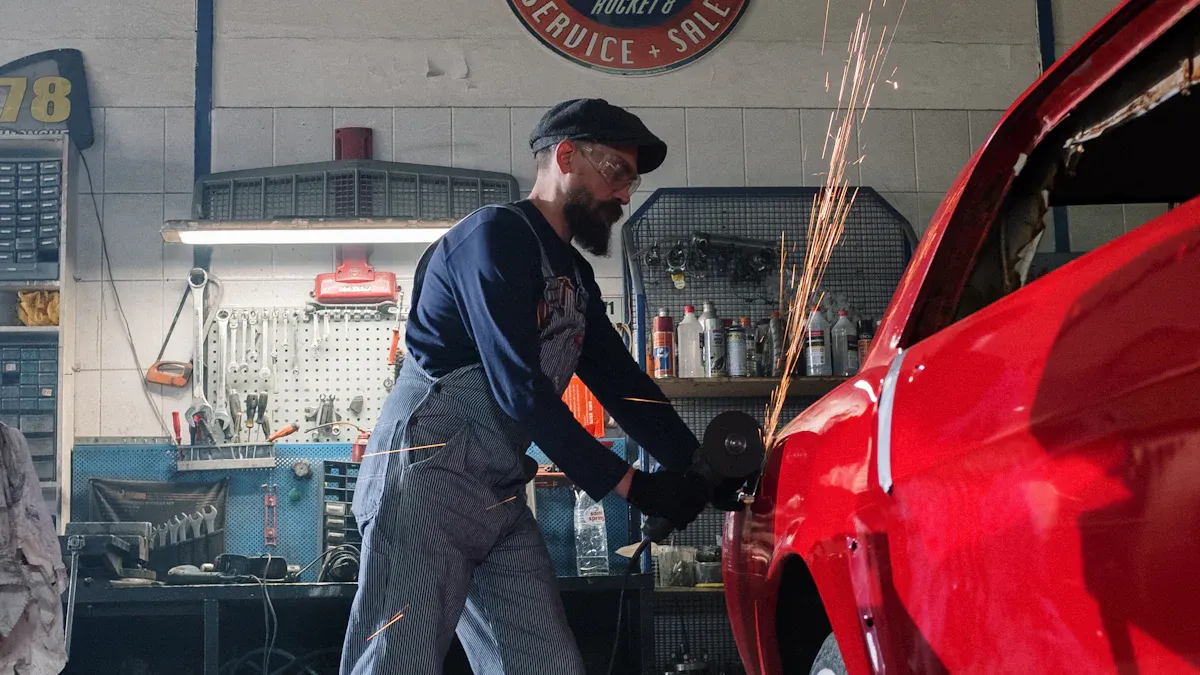
Daily routines form the bedrock of a successful maintenance program. Neglecting these fundamental tasks leads to significant consequences. Operators may face increased production downtime from frequent shutdowns and unexpected breakdowns. Costs rise due to premature tooling replacements and even expensive turret repairs. Most importantly, quality issues like inconsistent tablet weight, capping, and sticking can cause entire batches to be rejected. A disciplined daily regimen prevents these problems and ensures the machine operates at peak performance.
Pre-Operation Checks
An operator must perform a thorough inspection before starting any production run. This visual check is the first line of defense against operational failures.
- Inspect Key Areas: The operator should examine the turret, cam tracks, and pressure rollers for any signs of wear or damage.
- Verify Tooling Installation: They must confirm that all upper punches, lower punches, and dies are correctly seated and secured.
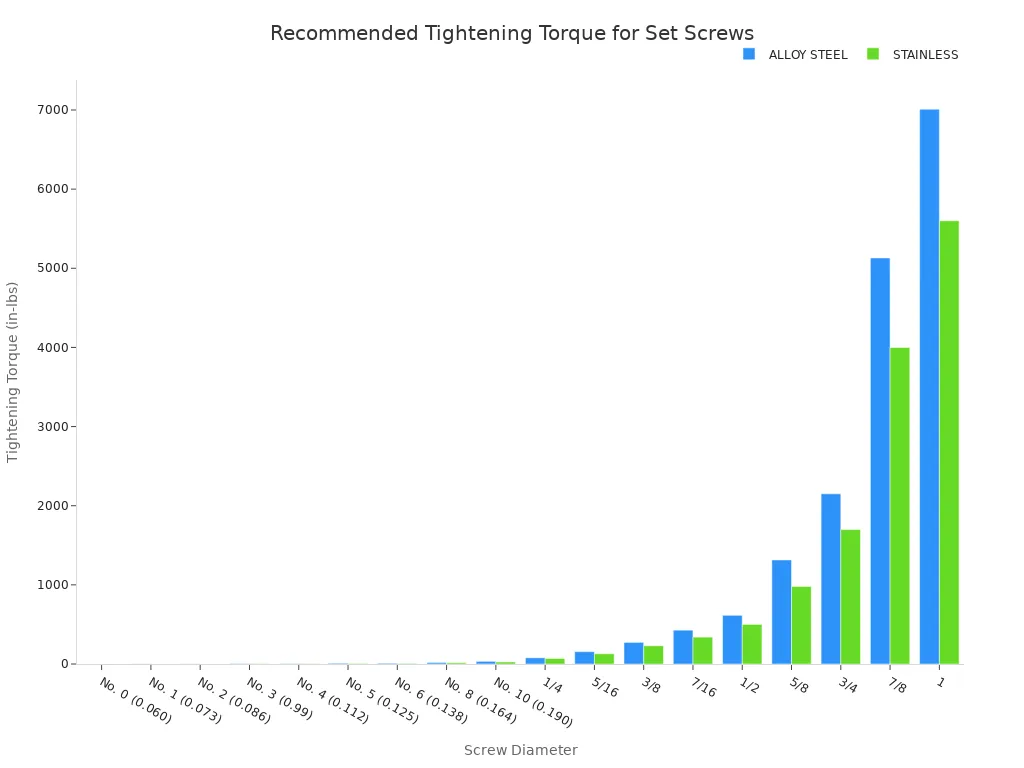
- Check Set Screw Torque: Loose tooling is a primary cause of damage. Operators need to use a calibrated torque wrench to verify that all punch and die set screws are tightened to the manufacturer's specifications. Incorrect torque can lead to tool movement, causing defects and damaging the press.
Note: Torque specifications vary based on the screw's diameter and material (Alloy Steel vs. Stainless Steel). Adherence to these values is critical for safety and performance.
| Screw Diameter | ALLOY STEEL Tightening Torque (in-lbs) | STAINLESS Tightening Torque (in-lbs) |
|---|---|---|
| No. 8 (0.164) | 19.4 | 16 |
| No. 10 (0.190) | 33.5 | 26 |
| 1/4 | 77.9 | 70 |
| 5/16 | 156 | 130 |
| 3/8 | 273 | 230 |
Post-Operation Cleaning
Immediate and thorough cleaning after each batch is non-negotiable. Product residue can harden, making it difficult to remove and potentially cross-contaminating the next batch. A systematic cleaning process protects the Rotary Tablet Machine and ensures product integrity.
A standard cleaning procedure includes several key steps:
- Safety First: The operator puts the machine in the "OFF" position and disconnects the main power supply.
- Disassembly: They carefully remove guards, the hopper, the feed frame, punches, and dies. Marking parts during removal helps ensure correct reassembly.
- Initial Powder Removal: A validated vacuum cleaner removes loose powder from the turret and other surfaces. Compressed air can also be used, but care must be taken to avoid spreading dust.
- Component Washing: The hopper, feed frame, and other accessories are cleaned with potable water and then rinsed with purified water.
- Deep Cleaning: All parts are then cleaned with a 70% v/v Isopropyl Alcohol (IPA) solution or another validated cleaning agent. Soft nylon brushes or copper wire brushes can dislodge stubborn residue from punches and dies.
- Final Wiping: The operator wipes all components with a clean, lint-free dry cloth until they are completely dry.
- Documentation: They affix a "Cleaned" label to the machine and complete the "Equipment Log Book" with the relevant details.
Expert Tip: Choosing the Right Cleaning Agent 💡 The choice of detergent is critical for effective cleaning. For general use, a mild detergent like Liquinox® is effective. For stubborn residues like enteric coatings, a mildly alkaline detergent is better. For removing specific Active Pharmaceutical Ingredients (APIs), a highly emulsifying agent ensures no residue remains.
Tooling Care and Storage
Proper care for punches and dies extends their life and guarantees consistent tablet quality. This process begins immediately after cleaning.
Drying is the most critical step to prevent corrosion. Any remaining moisture can cause rust or discoloration on the tooling's polished surfaces. Common industrial methods include:
- Air Drying: Allowing parts to dry in a clean, controlled environment.
- Purge Drying: Using a dry gas like nitrogen to displace moisture and accelerate evaporation.
- Vacuum Drying: Placing parts in a vacuum chamber to lower the boiling point of water, allowing it to evaporate quickly at a lower temperature.
Once tooling is completely dry, the operator should apply a light coating of a non-toxic, FDA-approved oil or rust inhibitor. This protective layer shields the steel from atmospheric moisture during storage. Finally, they must store the tooling in a clean, dry, and organized system, ready for its next use.
Weekly Maintenance for Your Rotary Tablet Machine
While daily tasks form the foundation, weekly maintenance involves a more detailed inspection of critical systems. This deeper look helps an operator identify developing issues before they cause significant downtime or damage. A consistent weekly schedule is essential for the long-term health of the Rotary Tablet Machine.
Key Component Inspection
An operator must perform a hands-on inspection of high-wear components. Cams and pressure rollers are subject to immense stress and require close attention. Ignoring signs of wear can lead to poor tablet quality and expensive repairs.
- Inspect Cams: The operator should look for visible grooves or rough spots. Worn cams can cause incorrect lower punch movement, leading to erratic tablet weights and increased rejections.
- Check Compression Rolls: They need to examine the roll surfaces for pitting or excessive play in the bearings. Pitting on a roll surface requires immediate replacement, as metal fragments can transfer to punch heads and cause further damage.
Lubrication System Verification
A proper lubrication system is the lifeblood of the press, reducing friction and preventing premature wear. A weekly check ensures the system is functioning correctly, not just that it has lubricant. The operator should verify the auto-lubrication system by observing a full cycle to confirm oil or grease is reaching all designated points. They must also check that all lubrication lines are clear and free of blockages.
Expert Tip: Use the Right Lubricant ⚙️ Always use the manufacturer-recommended, food-grade lubricant. Using an incorrect type can lead to inadequate protection, system clogs, or even product contamination.
Safety System Checks
Ensuring all safety features are operational is a non-negotiable weekly task. These systems protect operators from serious injury. A thorough check provides peace of mind and maintains a safe working environment.
The operator must perform several key tests:
- Systematically test each safety interlock on guards and doors to confirm the machine stops when a guard is opened.
- Activate the emergency stop button to verify it immediately halts all machine functions.
- Document all checks in the maintenance log. If any safety system fails a test, the machine must be locked out until a qualified technician completes the repair.
Monthly Maintenance: Overhaul and Calibration
Monthly maintenance moves beyond routine inspection into the realm of deep system checks, calibration, and strategic parts management. These comprehensive tasks are designed to reset the machine's precision, replenish vital fluids, and anticipate future needs. This level of overhaul is critical for preventing the gradual decline in performance that can lead to major failures and inconsistent production.
System and Sensor Calibration
Accurate sensors are the brain of a modern tablet press, providing the data needed for automated quality control. Over time, however, sensors can drift, and mechanical parts can wear, leading to inaccurate readings. Even systems with statistical process control are not completely reliable without proper calibration. Monthly calibration ensures that the machine's digital feedback reflects its true mechanical state.
A technician must perform routine calibration to prevent this deviation. This process ensures that precision-engineered components like force transducers and fill systems function correctly to minimize tablet weight and thickness variability.
- Verify Sensor Alignment: The technician checks that all sensors are physically aligned correctly. Misalignment can cause false readings.
- Use Digital Diagnostics: They employ the machine’s built-in diagnostic systems to test sensor outputs against known standards.
- Calibrate with Proper Tools: Calibration of pressure sensors requires specific tools, including a regulated pressure source, a pressure standard (calibrator), and the correct fittings to connect them to the device under test.
- Update Firmware: They check for and install any software or control system updates from the manufacturer. These updates often include improved auto-calibration features.
- Document All Changes: Every adjustment is recorded in the maintenance log. This history is invaluable for troubleshooting and continuous improvement.
Proven Results: The Impact of Regular Calibration 📈 Case studies show the significant benefits of a strict calibration schedule. One facility reduced its tablet weight variability by 30% simply by implementing regular sensor recalibration. Another high-speed production line saw a 25% reduction in weight deviation after updating firmware to use advanced auto-calibration features.
Deep Lubrication and Oil Changes
While weekly checks confirm the lubrication system is working, monthly tasks involve the complete replacement of essential fluids. Gearbox and hydraulic oils degrade over time, losing their protective properties and accumulating contaminants. Changing these fluids according to a set schedule is fundamental to preventing wear on the machine's most powerful and expensive components.
Manufacturers provide specific oil change intervals based on extensive testing. Adhering to this schedule is crucial for machine longevity.
- Initial Gearbox Oil Change: An operator should perform the first oil change after the initial 500 hours of operation to remove break-in debris.
- Regular Gearbox Oil Change: Subsequent changes should occur every 2,500 hours or every 6 months, whichever comes first.
- Hydraulic System Flush: A full hydraulic fluid flush and replacement should be performed based on the manufacturer's recommendation, typically every 6 to 12 months.
A complete hydraulic system flush is a detailed procedure that removes sludge, deposits, and contaminated fluid.
- Drain and Clean: The technician drains the entire system while the fluid is warm. They then use lint-free rags to clean all sludge from the reservoir.
- Flush the System: They flush the system with a lower-viscosity fluid to create turbulence that dislodges particles. They stroke valves frequently during this process to clean all pathways.
- Drain Flushing Fluid: They drain the flushing fluid completely and replace all system filters.
- Refill and Prime: The technician refills the reservoir to 75% with new, specified fluid. They then prime the pump by running it in short, repeated intervals.
- Operate and Bleed: They operate the system and cycle actuators one by one to circulate the new fluid. They bleed any trapped air from the system during this process.
- Final Filter Change: After the system reaches operating temperature, they perform a final shutdown and replace the filters once more to capture any remaining contaminants.
Wear Parts Inventory and Logs
No machine runs forever without replacing parts. A key monthly task is to inspect components known to wear out and to manage a corresponding spare parts inventory. This proactive approach turns a potential emergency shutdown into a scheduled, low-impact maintenance event. A comprehensive log of these activities is essential for tracking maintenance history and ensuring regulatory compliance.
An operator should regularly inspect high-wear parts on the Rotary Tablet Machine. Common components requiring attention include:
- Guide Rails: Worn or grooved upper and lower guide rails can impede punch movement.
- Pressure Wheels: Pitting or excessive play in pressure wheel bearings can damage punch heads.
- Punches and Dies: Chipped, worn, or bent tooling is a primary cause of tablet defects.
- Feeders: Wear on the underside of the feeder can lead to inconsistent powder flow.
Maintaining a detailed log and spare parts inventory is critical. This record helps identify trends, predict future needs, and minimize downtime.
| Category | Information to Include |
|---|---|
| Part Details | Part Name, Part Number, Supplier Details |
| Replacement Tracking | Last Replaced On, Next Replacement Due (based on hours or date) |
| Inventory Status | Current Stock Level, Reorder Point, Stock Available (Y/N) |
| Corrective Action | Issue Reported, Root Cause, Repair Performed By, Downtime (Hours) |
Troubleshooting Common Tablet Press Issues

Even with diligent maintenance, operational issues can arise. Understanding the root causes of common problems like weight variation, capping, and sticking allows an operator to resolve them quickly, minimizing product loss and downtime.
Solving Tablet Weight Variation
Inconsistent tablet weight is often the first sign of a problem. It frequently stems from irregular powder flow, which prevents die cavities from filling uniformly. An operator can diagnose and correct this issue by examining several key factors.
- Feeder Speed: Running the feeder too fast can cause powder segregation. The operator should run it as slowly as possible while still achieving the target weight.
- Fill Cam Setting: The fill cam should overfill the die by 10-30% to ensure consistency. Incorrect settings lead to weight fluctuations.
- Scraper Blade: A worn or poorly adjusted scraper blade fails to clean the die table properly, directly impacting weight control.
- Press Speed: Higher press speeds reduce the time a die spends under the feeder. This demands excellent powder flowability to prevent incomplete filling.
Note: A consistent powder level in the hopper is essential. It maintains stable head pressure, which directly influences how much powder enters the die.
Fixing Capping and Lamination
Capping (top separation) and lamination (horizontal splitting) are defects that indicate a weak tablet structure. These issues often point to problems within the powder formulation itself. Trapped air during compression is a primary mechanical cause, but formulation factors are more common.
An operator should investigate the following formulation characteristics:
- Moisture Content: Both excessive and insufficient moisture can weaken the bonds between granules.
- Binder Quantity: An inadequate amount of binder, or the wrong type, will fail to hold the tablet together under pressure.
- Excessive Fines: A high percentage of fine particles in the granulation can trap air, leading to weak points and separation.
Preventing Sticking and Picking
Sticking occurs when powder adheres to the punch face, while picking is when it lifts from the tablet surface and sticks in the lettering or logo. This issue is often related to the tooling and formulation. Poorly maintained or unpolished punch faces are more likely to cause sticking. Deep concave punch designs can also trap air, creating soft spots where material begins to adhere.
Applying specialized anti-stick coatings to punches is a highly effective solution. These coatings create a super-smooth, non-adherent surface.

As shown, advanced coatings like textured chromium-nitrate can completely resolve sticking issues where others fail. Choosing the right coating for a specific formulation is critical for the efficient operation of the Rotary Tablet Machine.
Adhering to a consistent maintenance schedule is the most effective strategy for extending a Rotary Tablet Machine's life. Proactive care minimizes costly downtime and guarantees product quality. This disciplined approach secures the capital investment for years to come. The results of such programs are significant.
Real-World Impact of Proactive Maintenance 📈
- A nutraceutical operation cut unplanned downtime by 45%, saving $1.2 million annually.
- An API facility reduced emergency maintenance events by 60% in just six months.
- Targeted sensor investments decreased downtime on granulators and capsule fillers by 25-35%.
A structured plan protects your assets and ensures operational excellence.
FAQ
How often should an operator clean the tablet press?
An operator must clean the machine thoroughly after every production batch. This practice prevents cross-contamination and hardened residue. A complete cleaning involves disassembling key parts, vacuuming loose powder, and washing components with a validated cleaning agent. This ensures product integrity and machine readiness.
What is the most common cause of tablet weight variation?
Inconsistent powder flow is the most frequent cause of weight variation. It prevents dies from filling uniformly. An operator should check the feeder speed, fill cam settings, and the scraper blade's condition. A consistent powder level in the hopper also maintains stable head pressure for uniform filling.
Why is using a torque wrench so important? 🔧
A torque wrench ensures tooling set screws are tightened to the manufacturer's exact specifications. Incorrect torque leads to major problems. Loose tooling causes tablet defects and damages the press. Over-tightening can strip threads or damage the tooling itself. Proper torque is critical for safety and performance.
Can an operator use any lubricant on the machine?
No, an operator must only use the manufacturer-recommended, food-grade lubricant. Using the wrong type can cause system clogs, inadequate protection against wear, or even product contamination.
Important: Always verify the lubricant type in the machine's manual to ensure compliance and safety.
See Also
Top 5 Applications for Single-Stage Rotary Vane Vacuum Pump Sets
Nozzle Solutions: Essential Insights for Diverse Industrial and Home Applications
Tablet Sampling Machines: A Comprehensive Guide for Laboratory Selection
Rotary Vane Vacuum Pumps: Understanding Their Function and Operation
Simple Maintenance Practices to Avoid Dumbwaiter Elevator Malfunctions