Navigating the World of Direct to Film Printing Technology
Direct to film printing dtf technology presents a revolutionary method for creating vibrant, full-color designs on a vast range of fabrics. Its global market, valued at USD 2,720.0 million in 2024, reflects its growing adoption. The process empowers hobbyists and large-scale businesses to produce high-quality custom apparel without typical printing limitations.
Key Takeaways
- DTF printing makes colorful designs on many fabrics. It uses a special film, adhesive, and heat. This method is popular for its simple process and good results.
- DTF printing works on many materials. These include cotton, nylon, and leather. The designs last a long time, even after many washes.
- DTF printing is good for many users. Hobbyists and big businesses can use it. It offers a flexible way to make custom clothes.
What Is DTF Printing and Why Is It Popular?
Direct to film printing dtf technology is a unique decoration method. It transfers full-color designs from a special film onto fabric using a combination of adhesive and heat. This process has gained immense popularity for its simplicity and high-quality results.
Understanding the Core Concept
The DTF process involves a few key stages to create a finished garment. Each step plays a crucial role in bonding the design to the fabric.
- A design is first printed in reverse onto a clear transfer film using specialized CMYK and white inks.
- A fine adhesive powder is then applied to the wet ink, covering the entire printed area.
- The film and powder go through a curing process, where heat melts the adhesive into a smooth, even layer.
- Finally, the cured film is placed on the garment and pressed with a heat press, transferring the design permanently onto the fabric.
The Key Benefits: Versatility and Durability
DTF printing offers significant advantages over other methods. Its primary benefit is its incredible versatility. The process works on a vast array of materials beyond standard cotton, including:
- Cotton-polyester blends and tri-blends
- Nylon and other synthetics
- Canvas and denim
- Treated leather and silk
Another major benefit is durability. A properly applied DTF transfer can endure 50 to 100 wash cycles without significant fading, cracking, or peeling, ensuring a long-lasting, professional-quality product.
Who Should Consider DTF Printing?
This technology serves a wide range of users. Hobbyists and small businesses can easily enter the market by purchasing pre-printed transfers for a low initial cost. Entrepreneurs ready to scale up can invest in entry-level printers. Large-scale operations benefit from high-volume machines that maximize production efficiency. The flexibility of direct to film printing dtf technology makes it a viable option for nearly any custom apparel creator.
The Step-by-Step Guide to Direct to Film Printing DTF Technology
The direct to film printing dtf technology process transforms a digital design into a wearable graphic through four distinct stages. Each step is critical for achieving a high-quality, durable finish.
Step 1: Printing Your Design on DTF Film
The process begins with a specialized DTF printer. The operator prints the design in reverse, or as a mirror image, onto a sheet of clear PET transfer film. The printer first lays down a layer of CMYK color ink. It then prints a final layer of white ink on top, which serves as the base for the design on the garment.
Step 2: Applying the Adhesive Powder
While the ink is still wet, the operator applies a thermoplastic polyurethane (TPU) adhesive powder. It is crucial to cover the entire printed area evenly. Excess powder is then shaken off, ensuring the adhesive only sticks to the inked portions of the design. This powder acts as the bonding agent between the ink and the fabric.
Step 3: Curing the Ink and Powder
Next, the operator cures the powdered film. Heat melts the adhesive powder, turning it into a smooth, rubbery layer. This can be done with a heat press, a curing oven, or a heat gun. The goal is to melt the powder until it appears glossy.
| Curing Method | Temperature Range | Time Duration |
|---|---|---|
| Heat Gun | Move in circular motion | 30-60 seconds |
| Oven | 320-350°F (160-176°C) | 2-10 minutes |
| Heat Press (hover) | 325°F (160°C) | ~2 minutes |
Step 4: Transferring the Design with a Heat Press
The final step involves transferring the design. The operator places the cured film onto the garment and presses it using a heat press. The combination of heat and pressure permanently bonds the design to the fabric. Settings vary by material.
| Fabric Type | Temperature | Time | Pressure |
|---|---|---|---|
| 100% Cotton | 315-350°F (157-176°C) | 12-15 seconds | Medium-Firm |
| Polyester & Blends | 270-325°F (132-163°C) | 10-15 seconds | Medium |
After pressing, the operator lets the transfer cool before peeling the film away, revealing the finished, vibrant design.
Your Essential DTF Supplies and Equipment Checklist
Assembling the right tools is the first step toward mastering the direct to film printing dtf technology process. A complete setup includes core machinery, consumable supplies, and essential software. Each component plays a vital role in producing high-quality, durable custom apparel.
What Is the Essential DTF Equipment?
The primary equipment forms the foundation of any DTF operation. The initial investment can vary significantly based on production volume and business goals. Entry-level machines often start around $2,500, while comprehensive industrial setups can exceed $25,000.
- DTF Printer: This is the most critical piece of equipment. Printers like the InkSonic R1390 C13 are cost-effective for beginners, offering high-resolution output. The XP600 U13 series boosts productivity by 150%, making it ideal for high-volume needs. For maximum efficiency, the U13D model uses dual printheads to increase output by 250%.
- Curing Device: After applying the adhesive powder, the film must be cured. An A3 DTF Oven provides consistent, even heat. A heat press can also be used in "hover" mode, or a heat gun can work for very small-scale jobs.
- Heat Press: A quality heat press is non-negotiable for transferring the design from the film to the garment. It must provide consistent temperature and even pressure to ensure a permanent bond.
- Automated Powder Shaker: For businesses looking to scale, an automated powder shaker is a game-changer. This machine applies the adhesive powder and cures the film in one streamlined step. It eliminates manual labor, reduces mess, and ensures consistent application for every transfer.
What Are the Necessary DTF Supplies?
Consumable supplies are just as important as the machinery. The quality of these materials directly impacts the final look, feel, and durability of the print.
DTF Inks Specialized pigment inks are required for this process. A standard setup uses Cyan, Magenta, Yellow, and Black (CMYK) inks for the color layer and a high-opacity white ink for the base layer.
DTF Adhesive Powder This thermoplastic polyurethane (TPU) powder melts during the curing stage to create the bonding layer. It comes in different grades for various applications:
- Fine Powder: Ideal for designs with intricate details. It provides the softest feel on the garment.
- Medium Powder: A versatile, all-purpose option that balances good adhesion with a soft touch.
- Coarse Powder: Best for heavy-duty fabrics like canvas or uniforms. It offers the strongest bond but results in a firmer feel.
DTF Transfer Film Designs are printed onto Polyethylene Terephthalate (PET) film. These films are available in two main types: hot peel and cold peel. The choice between them affects both workflow and the final finish of the design.
| Feature | Hot Peel Film | Cold Peel Film |
|---|---|---|
| Peeling Time | Immediately after pressing | After the film cools completely |
| Finish | Glossy and smooth | Matte and subtle |
| Durability | Moderate | High |
| Application Speed | Faster | Slower |
Hot peel film allows for immediate peeling, which significantly speeds up production for high-volume orders. Cold peel film requires a cooling period but offers superior durability and preserves fine, intricate details, making it a great choice for premium products.
What Software and Accessories Do I Need?
Beyond the main hardware and supplies, several other items are necessary for a safe and efficient workflow.
Software A Raster Image Processor (RIP) software is essential for DTF printing. This program processes your design files and correctly translates them for the printer. It controls ink levels, manages the white ink base layer, and ensures accurate color reproduction.
Safety Accessories
Important Note: The DTF process can release fumes from the inks and melting adhesive powder. Proper ventilation is crucial for operator safety. A dedicated fume extractor or a high-quality air purifier should be placed near the curing station to capture and filter airborne particles. Operators should also use Personal Protective Equipment (PPE), including safety glasses and a respirator mask.
Maintenance Supplies Regular maintenance keeps a DTF printer running smoothly. Essential supplies include:
- Cleaning swabs
- Specialized cleaning solution
- Syringes for flushing printheads
- Lint-free cloths
Having these items on hand helps prevent clogs and ensures consistent print quality over time.
Choosing the Right DTF Printer for Your Needs
Selecting the right printer is the most significant decision an entrepreneur will make when entering the world of direct to film printing dtf technology. The ideal machine depends entirely on production goals, workspace, and budget. A small startup has very different needs than a high-volume commercial print shop. This guide explores options from entry-level desktop models to industrial powerhouses and details the key features to compare.
Desktop Printers: Prestige R2 for Startups
Desktop DTF printers offer a powerful yet compact solution for startups, small businesses, and hobbyists ready to produce their own transfers. These machines provide professional-grade quality without the massive footprint or cost of industrial equipment. The Prestige R2 is an excellent example of a printer designed for this market. It balances performance with a manageable size, making it suitable for users with intermediate experience.
The Prestige R2 uses dual Epson i1600 printheads to achieve a respectable production speed of 30-35 square feet per hour. This allows a small shop to produce approximately 180 designs (12" x 14") in a standard eight-hour workday. Its specifications provide a clear picture of its capabilities:
- Printheads: Dual Epson i1600
- Software: neoStampa RIP Software
- Maximum Print Width: 13 inches (33 cm)
- Printing Speed: 30-35 sq. ft./hour
- Daily Output: ~180 pieces (12" x 14" design)
- Dimensions: 33.58” x 25.31” x 20.86”
This combination of speed, quality, and size makes it a strong contender for businesses looking to scale beyond pre-printed transfers and take full control of their production.
High-Performance Printers: MTuTech for Volume
For large-scale commercial operations, efficiency and output are paramount. High-performance, roll-to-roll printers are built to run for long hours and produce thousands of transfers with minimal downtime. Brands like MTuTech specialize in these industrial systems. Their printers are engineered for maximum productivity, enabling businesses to meet demanding order volumes.
The output of these machines is measured in hundreds of units per hour. The MTuTech MT-DTF 60Plus II, for example, is a flagship system capable of producing up to 220 t-shirts per hour. This level of productivity is essential for businesses that supply other apparel decorators or manage large corporate and event orders.
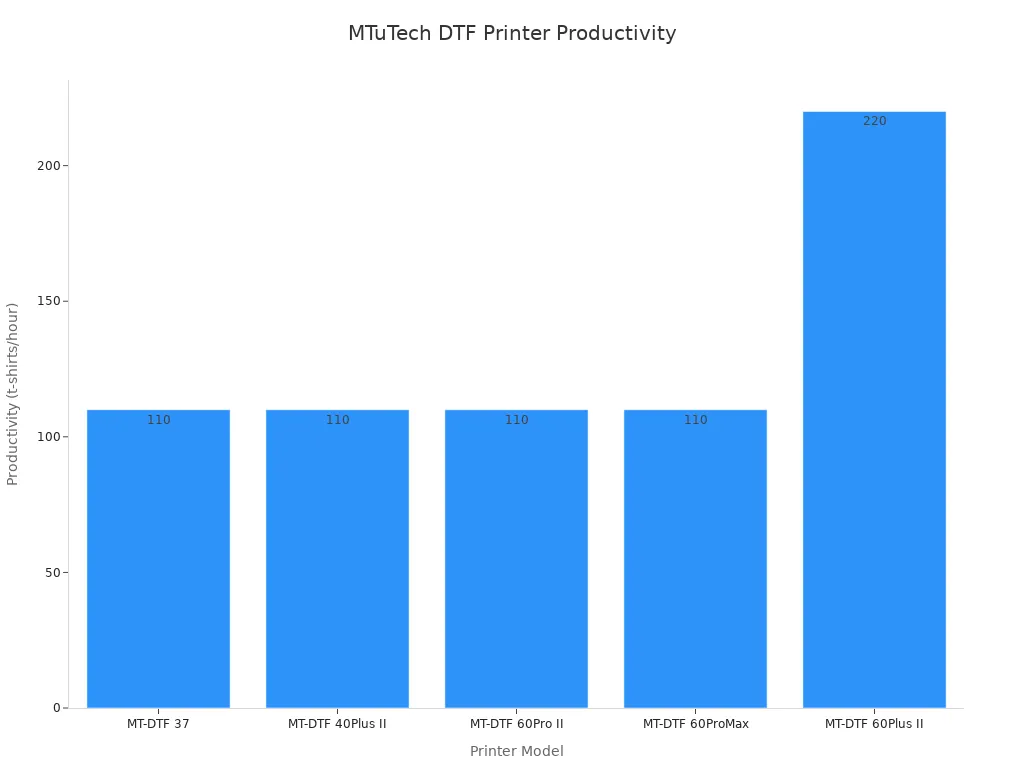
The productivity across MTuTech's professional line demonstrates how different models cater to specific volume needs.
| Model | Productivity (t-shirts/hour) |
|---|---|
| MT-DTF 37 | 110 |
| MT-DTF 40Plus II | 110 |
| MT-DTF 60Pro II | 110 |
| MT-DTF 60ProMax | 110 |
| MT-DTF 60Plus II | 220 |
Key Features to Compare in a DTF Printer
Beyond brand and size, several technical features determine a printer's performance, reliability, and print quality. A careful comparison of these elements ensures a business invests in a machine that aligns with its quality standards and operational needs.
💡 Pro Tip: A printer is a long-term investment. Prioritize reliability and support alongside the initial purchase price.
1. Printheads and Print Speed The printhead is the heart of the printer. Many modern printers use dual printheads to increase speed without sacrificing quality. The type of printhead also matters.
- Epson XP600: Often found in entry-level models, this printhead is an affordable option for smaller batches.
- Epson i3200-A1: A mid-range to industrial printhead that delivers higher resolution and significantly faster speeds for high-volume work.
2. Print Resolution and Color Quality Print resolution, measured in Dots Per Inch (DPI), dictates the level of detail a printer can produce. A higher DPI creates sharper images and smoother color gradients.
- A resolution of
720x1200 DPIis a solid baseline for production work. - A resolution of
1440x1440 DPIor higher yields premium, photo-quality results with vibrant colors and crisp text.
The standard ink configuration is CMYK plus White (CMYK+W). The white ink is crucial for creating an opaque base on dark garments, making the colors pop.
3. Ink Circulation System The white ink used in direct to film printing dtf technology contains heavy titanium dioxide pigments that can settle and cause clogs. A reliable white ink circulation system is non-negotiable. Quality printers automate this process to prevent sedimentation. Advanced systems may feature:
- 3-in-1 Circulation: Combines ink mixing, filtration, and circulation for a consistently smooth ink flow.
- Auto Start/Stop: Activates the circulation system automatically when the printer is powered on, reducing manual maintenance and potentially extending printhead life by up to 50%.
4. Warranty and Technical Support Even the best printers require maintenance and support. Before purchasing, an operator should understand the warranty and support structure.
- Warranty Period: Varies significantly by brand, from 6 months to 3 years on certain components. Crucially, most warranties exclude the printhead, which is a consumable part.
- Support Model: Some companies require users to ship the printer back for repairs. Others provide replacement parts for self-installation with remote guidance. Brands like DTF PRO™ and InkSonic emphasize their strong remote diagnostic support to resolve issues quickly.
Understanding these policies provides peace of mind and protects the investment from unexpected downtime.
DTF vs. Other Printing Methods
Choosing the right decoration method is critical for achieving the desired quality, cost, and efficiency. Direct to film printing dtf technology offers a unique balance of benefits, but understanding its advantages over other popular techniques like Direct-to-Garment (DTG) and Heat Transfer Vinyl (HTV) helps businesses make informed decisions.
DTF vs. Direct-to-Garment (DTG)
DTG printing applies ink directly onto fabric, much like an inkjet printer on paper. This process creates an exceptionally soft and breathable print. DTF, however, prints on a film that is then transferred, resulting in a different feel.
| Feature | DTG Print | DTF Print |
|---|---|---|
| Hand-feel | Soft, blends into fabric | Slightly raised, rubbery feel |
| Breathability | Excellent, very breathable | Less breathable on large designs |
DTF's main advantage is its versatility with fabrics and its cost-effectiveness for dark garments. A DTG print on a dark shirt requires a costly pretreatment and white ink underbase, driving the cost to around $0.75-$0.85 per print. DTF provides a consistent cost regardless of garment color.
DTF vs. Heat Transfer Vinyl (HTV)
HTV involves cutting designs from colored vinyl sheets and pressing them onto a garment. This method becomes very time-consuming for complex, multi-color designs, as each color requires separate cutting, weeding, and layering.
Production Speed: DTF printing eliminates the weeding process entirely. This makes it significantly faster for intricate designs and high-volume orders. Operators can also print and store DTF transfers for up to a month, streamlining future production.
DTF also offers superior durability. The ink bonds with the fabric, creating a flexible print that resists cracking and peeling. In contrast, lower-quality HTV may lift or fade after just a few washes.
Which Method Is Best for Your Project?
The ideal method depends on project volume and complexity.
- Small Runs (1-20 items): DTF and DTG are highly cost-effective due to minimal setup costs. DTF is the clear winner for synthetic fabrics or multi-color designs.
- Large Runs (100+ items): DTF excels here. Its speed for complex graphics and the ability to pre-produce transfers make it more efficient than layered HTV.
Ultimately, DTF provides an unmatched combination of material versatility, vibrant color, and production efficiency for a wide range of order sizes.
Safety and Workspace Setup
A safe and controlled workspace is fundamental for successful direct to film printing dtf technology operations. Operators must manage airborne particles and maintain specific environmental conditions to protect both their health and their equipment. Proper setup ensures consistent quality and a secure printing process.
Why You Need a Fume Extractor or Air Purifier
The DTF curing process involves heating adhesive powder, which releases fumes containing Volatile Organic Compounds (VOCs). These chemicals can pose significant health risks with prolonged exposure.
| Chemical | Health Risks |
|---|---|
| Toluene | Neurological, respiratory irritation |
| Xylene | Kidney, liver damage |
| Methyl Ethyl Ketone | Dizziness, nausea |
A dedicated fume extractor is essential for capturing these harmful particles at the source. A quality unit, like the UniNet Fume Extractor, uses a multi-stage filtration system to achieve a high purification rate.
- Airflow: 106 CFM
- Motor: 80W DC motor
- Purification Rate: 99.91%
- Features: 3 Stage Filters, 3 Speed
Positioning an extractor near the curing station is a critical step for maintaining safe air quality.
Essential Personal Protective Equipment (PPE)
Operators should always use Personal Protective Equipment (PPE) when working with DTF supplies. The fine adhesive powder can become airborne during application and is easily inhaled.
🛡️ Safety First: Safety experts suggest that a standard face mask or any respirator will work effectively to keep these particles out of your lungs.
In addition to a mask, wearing safety glasses protects the eyes from stray powder or chemical splashes during maintenance.
Creating an Optimal Printing Environment
The performance of DTF supplies is highly dependent on the printing environment. Temperature and humidity directly affect film and powder, potentially causing print defects or waste. Storing materials in a climate-controlled room is crucial for consistency.
| Material | Temperature Range | Humidity Range |
|---|---|---|
| DTF Film Rolls | 18–24°C (65–75°F) | 40–60% RH |
| DTF Powder | 20-22°C (68-72°F) | Below 50% RH |
Maintaining these conditions prevents film from warping and keeps adhesive powder from clumping, ensuring a smooth and reliable production workflow.
Direct to film printing dtf technology offers an unmatched combination of flexibility, quality, and efficiency. Entrepreneurs find it a game-changer, unlocking significant creative and commercial potential. By understanding the process and carefully selecting equipment, operators can build the perfect setup. Assessing budget and production goals is the essential first step.
FAQ
Can I use a regular printer for DTF?
No. An operator needs a specialized DTF printer. It uses specific inks and can print the required white ink base layer, which standard office printers cannot handle.
How long do DTF transfers last?
DTF transfers are highly durable. A properly applied design can withstand 50 to 100 wash cycles. It resists cracking, peeling, and fading for a long-lasting, professional finish.
What fabrics work with DTF?
DTF printing works on many fabrics. This includes cotton, polyester, blends, nylon, and even treated leather. Its versatility makes it a superior choice for diverse apparel decoration needs.
See Also
Automatic UV Coaters: Indispensable for Modern High-Speed Printing Operations
Versatile Nozzle Solutions: A Guide for Diverse Industrial and Horticultural Applications
Future-Proofing Carton Production: Top Folder Gluer Innovations for 2025
Advanced Precoating Materials: Enhancing Filtration System Performance in 2025
Demystifying Sterile Filter Devices: A Comprehensive Look at Their Functionality